More uWho updates – Can now open folders of images, basic logic for opening IPcameras

This is what my program looks like now! The first 3 work well, with the 4th (IPCams) being worked on as I type. I’m going to look for processing 10 at most, to start with. I’m also needing some sort of pretty feedback for the Open Folder, as I currently have feedback via a qDebug() , which is very much against user interactive good practices.
I’ve my work cut out for me!
Project: https://github.com/jwcrawley/uWho
uWho – Added GUI to it, cleaned up code, adding features
 This is now what you are greeted with on startup. Simple and to the point.
If you click on Open Video file, you get a QT file dialog. Select the video you want to process. For example……
 Pulls the face in the video stream, and classifies it as the number in the upper right of the rectangle around her face. Press escape or close to close it and go back to the main screen.
Or if you want Webcam data processed, click on the webcam. Make sure to have a webcam plugged in. Else, crash. Yeah, I know.
 And, it just works!
I’ll be adding in file management for figuring out who people are, and more bells and whistles.
Project: https://github.com/jwcrawley/uWho
uWho – Face recognition and tracking program
I just got done with my initial test, using an experimental faceRecognizer library in OpenCV. This program is uWho (Github Link)
The program works pretty well. It’s simple, as it opens up a OpenCV window, displaying video content immediately. The QT side is sparse, and does nothing… yet. I’m looking at possibly adding a way to control threshold as well as person count.
This person count isn’t just counting faces, but tries to identify who someone is from previous frames. If you are unknown, your likeness is added to the collectiv(Ω>0 is futile) existing database of faces and further trained on you. If you are known, your face is added as more training data from your previous face data.
As an example, here is uWho classifying the faces on a google image search for “faces”.
 Key: Each face has 2 numbers: The upper left is the index of the face found by faceClassifier. The number in the upper right, if displayed, is what the machine learning algorithm detects as a unique face. This face is then given a random number initially.
I made this for a convention we are hosting in Bloomington, Indiana called Makevention(Link to upcoming convention). We needed a way to count how many uniques we have show up. This way seems to be the best. However we still need to discuss this in our next meetings to see if this solution is appropriate. If so, how do we publicly disclose it and all the other privacy issues. We’re not Facebook(2), we’re a hackerspace! We get it!
Regarding badness: My program only profiles and saves the unique data from a face, locally. It’s saved in the project directory as face.xml . This program does nothing online. I am seeking the ‘do no evil’ idea. Facebook and its like already have this that they use against users. My goal is this can be used in a multitude of areas. If you have a building and a club, you can watch when people enter/leave. It’s also good for conventions, given you tell people!
Me, being classified: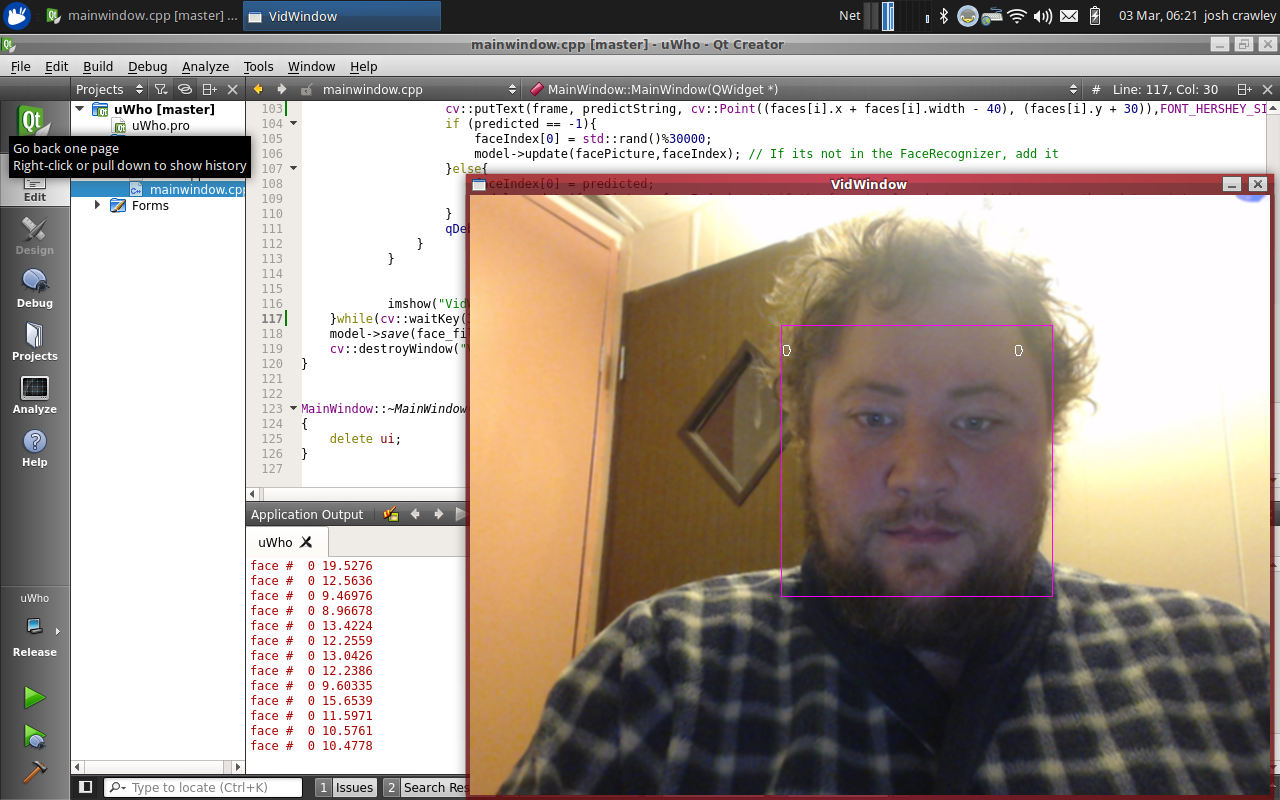
Dual Complementary Optoisolator Logic

Opto-isolator logic. How peculiar and awesome at the same time.
Trigger Zone software – Opens webpages on motion
http://ift.tt/1AMKAlM This is my project that competes (freely) with Webcam Zone Trigger. It failed, so I built this in processing.
This is our Tech showcase, and my Trigger Zone shows off some of the features we currently have. We have a few Oculus Rifts (DK1 and 2). We also have a Liquid Galaxy setup that I built.
Get the software on my Github at:
Processing + Kinect = interactive tracking software for cool demos!
I recently tried to use Webcam Zone Trigger for a work project.
This software is for making interactive demo walls, where you walk somewhere around a room, and the monitor updates to the appropriate website, or sends an email, or saves the picture… or something. Essentially, its IFTTT for video data. We were using it for an interactive demo where someone can walk up to new devices and technology, and a big monitor updates with the content we wrote about it, or autoplays a Youtube video.
We already paid for a license ($99 or something like that). And guess what? It stunk.
Well, why did it fail my expectations? When I hooked it up to a Kinect, it displayed the 640×480 depth window as the upper left of 320×240 expanded to 640×480. Below is what it SHOULD have looked like (or what the Freenect does seamlessly):
 Ok. That looks sane. And BTW, picture shamelessly ripped off of http://www.mindtreatstudios.com/how-its-made/kinect-real-life-occlusion-rendered-content .What Webcam Zone Trigger did was the following:
 Dafuq? Why is something that claims to work well with the Kinect doing this? Possibly my fault.
Checks Kinect SDK and drivers? Using 1.8 . And it works well with other Kinect apps.
Checks OS integrity. Reinstalls Win7 x64 from scratch. Still same problem.
Check Kinect on Linux. Perfect, no hiccups. No problems.
So the problem is Webcam Zone Trigger. So, what can I do to re-make this program so it opens up a webpage when someone walks through a trigger? Well, I should be able to do it in Processing. I’ve done plenty of demos and proof of concepts in that language before. So I download it and “install” (meaning drag zipped directory to desktop). Then I run Processing and Sketch>Import Library> Add Library and then search for SimpleOpenNi . Remember, I’m doing this with MS SDK on a Windows machine. Else, I’d be using Open Kinect For Processing (libfreenect).
Aaaaand… Voila! Trigger Zone.
After preliminary tests, I made 4 zones around our tech showcase. When you walk up to one, it pops up on the main big screen the details of that device. I also have it set up in the browser to only use a single tab and a single browser.
My next update will to be to add a sound file to play to each zone. That should be very simple. The goal here is to find sounds that are delicate and informative. Long winded diatribes about tech can suck if you’re not interested. Perhaps a ‘ding’ would suffice.
But so far, SUCCESS!
Chinese Shipping Fairy came : loads of goods
I’ve, like most people around this time, have been very busy with family requirements. But aside the holiday season..
I GOT COOL STUFF!
To start, I bought 2 hot ends for my Prusa I2 Reprap printer. I purchased 2 of them for $20 total. One is a .4mm end and the other is a .2mm end.

 They were completely wired up with the heater core and thermistor already. When I get a chance, I will show their print quality. Still not done with holiday requirements…. Yet.
Next up is a 9DoF accelerometer. The price is $6.28, and is a breakout board for the 9150 Invensense. The board is super-small and 8 of the chips could fit on my pinky fingernail. The company also included 2 headers : one straight, and the other 90 degrees.
The only bad thing is the company (Invensense, NOT the Chinese dropshipper) misrepresented how it can give the Euler Angle and other processed data. If you pay a few thousand dollars, you can get the permission to write your own firmware for the 9150 that might be able to do that. But for now, you do the math in the CPU you hook it up to.
 Third, I put in an order for mini Arduino clones as well. I don’t know what to say, other than they work, and well! They’re breadboardable, which makes prototyping easy. No having to bolt down the standard Arduino somewhere.It uses an Atmel MEGA328P AU 1437. The reset switch seems a little loose, but it’s one of those SMT switches. A dab of superglue will fix that. On the underside, you see the USB transceiver chip, the same as my other Arduino clones. It’s another HL-340.
 Lastly, I received my GPS chip. And holy smokes its AWESOME!! It’s also tiny and light weight. It came in a box 30x its size, and _WELL_ packed. It has a wiring harness that plugs into the port on board, as well as through holes for easy soldering.
He’s having some supply issues, so even though I bought it for $10, he has to sell a ‘Lot’ of 70 in order to get more. So bummer on that front.


Arduino clones received – pics and discussion
I am a big proponent of Aliexpress / Ali Baba along with other reputable Chinese drop shippers. There’s many a things I couldn’t afford to do if I had to buy US everything… and there’s even quite a few things I’d not be allowed to purchase because of bad laws. But, I digress.
On December 2, I put in the purchase order for 2 Arduino UNO clones. They clearly say UNO, but are absent all Arduino logo and trademarks. Cool. I don’t like to buy material that clearly rips off the names, so I stay away from “Arduino UNO” branded goods, as they well, aren’t.
And I just received the 2 UNOs I ordered yesterday.

The kit didn’t come with the required USB B cable. Big deal.. It’s not like I don’t have 10 or so of those cables. One nice thing about these are that I also received 4 10-headers. Awesome. I can never have enough of those.
I power the first on up, and there’s no program aside the Arduino bootloader loaded on the ATMEL Mega328P (AU 1436). Ok. So I load BLINK. Works perfectly on both.

So, how did the Chinese get this Arduino clone so cheap? We’ll have to look into the board a bit further to figure that out.
 The first thing’s obvious: There’s no Atmel (8/16)u2 serial-USB chip. Instead, there’s a Chinese chip, a CH3400. Makes sense, as the Atmel chip goes for $4.30 in single quantities. That’s more than the entire board! But some people talk about driver issues. It seems like if you run Windows or Mac, you’re going to be hunting for drivers which may or may not work. Fortunately, we Linux folk already have a generic USB-Serial driver for any device that implements it. So, everything for us just works. Yay Linux! There’s also a 4 pinholes in a header line to reprogram this chip, I’m guessing. It’s labeled X1.
But for the others, this is the lsusb output: 1a86:7523 QinHeng Electronics HL-340 USB-Serial adapter
Next off, there’s no DIP socket/DIP chip. It’s a pain, as I like using my Arduino (and clones) as programmers for Atmel chips. But I also know there was a shortage going on. And frankly, SMT profile does make sense in cutting down cost. Sockets are expensive (in a $3~ board).
Next thing is the LDO voltage regulator. According to my SOT chip silkscreen, it says it’s a AMS1117 5.0 H1418 (PDF). I’m unsure as to how to check if it’s the “real thing”, given recent Reddit posts of exploding LDO VR’s . So I’ll just have to consider it close tolerance to 5V.
Next is the crystal. Peculiar – 12.000 MHz (16 HMN 1311). A quick search didn’t shoe me the crystal, but I know the reference design calls for a 16.000 MHz crystal. So, possibly underclocked.
I also notice the block of pins ready for headers above the ANALOG section. They’re broken out in a really nice section, seemingly ready for solder and simple connections. Nice and convenient. And lol on the “ISCP”. Simple acronym spelling mistake.
I can also appreciate on this board more than reference: for each of the main pinout female headers, there’s holes for you to attach your own male headers as well. I really like that.
Also, the soldering job on the boards are quite well done. There’s one pin on the ICSP that needed (in my opinion) a tiny bit more solder, but it still works perfectly fine.
The downsides: Shipping. The shipping cost was “free” (read: amortized within the good). I’ve no problem with that. But the shipping time was 13 days, from China. That’s awesome if you need X Arduino-compatible devices in a few weeks. But if you need one now, there is Radio Shack (cringe… cant believe I just said that).
The other downside is you are not purchasing devices from Arduino.cc . They were the ones who started the super simple platform using Atmel chips that brought physical computing to the masses. And their official builds are rock-solid. I am just poor, and get by with the 90% solution.
W00t: Local hackerspace member Steve made IoT Bathroom occupancy light
I’m a member of Bloominglabs here in Bloomington, IN. A good friend of mine, Steve, made an “internet of things” bathroom occupancy light. He’s always doing something awesome with embedded systems, and this is his newest exploit. Not only that, but he brought us a great Instructable to boot!
As for me, I ordered 4 ESP8266’s from Ali Express. They’re 75MHz cpus with 802.11bgn with 2 GPIO pins.. for $3 ! I still do not have them in yet, but I’m already looking towards IoT as well. We’ll see what we can do with cheap, powerful IoT.
Snapfish hatred! Warning – rant
My wife and I were married October 11. Awesome! Yesterday we just go photos of our wedding. +800 pictures… Yeowsa!
So, we figured Snapfish would be a good place to have a photobook made. My wife has seen their quality. They’re awesome. So, on to the website. We upload lots of images. LOTS. Engagement, wedding, yadda yadda.
She’s better at aesthetic design than I, so she did the bulk of the work. We spent 5 hours today doing it.
We get home, and hop on the computer to finish the book. NOPE!
Snapfish decided to not save 3 of the 5 hours of work because: browser failure, server failure, autosave failure. But their chat people were apt to blame us for not saving! And yet, why have an autosave feature if it doesn’t work?
When we went to chat to resolve this, YOUR chat people blamed me and my wife for ‘not saving’. So, why have autosave when it does absolutely nothing????
Oh well. She recreated the work on CVSphoto.com , and she’s about 1/2 way done within 1 hour of working on it. Talk about Snapfish failure. And were we were, going to recommend others if it worked well for us.

